
티스토리 뷰
1. 비교 연산자 ★★★
두 피연산자의 값을 비교하여 참(true) 또는 거짓(flase) 값을 반환
| > | >= | < | <= |
| 크다 | 크거나 같다 | 작다 | 작거나 같다 |
| == | === | != | !== |
| 같다 | 값과 데이터형 모두 같다 | 같지 않다 | 값과 데이터형 모두 같지 않다 |
근데
자바에서 데이터형이 다른 숫자와 문자열을 요령있게? 처리해줘서
ex) 5 == '5' 전자는 숫자고 후자는 문자라 다른데 자바에서 요령있게 처리.
===, !== 연산자 등장.
=== : 값과 데이터형이 모두 같냐? 같으면 true, 다르면 false.
!== : 값과 데이터형이 다르냐? 다르면 true, 같으면 false.
예제)
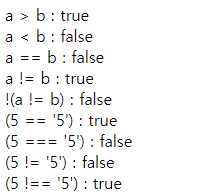
-코드
<script>
    let a = 7;
    let b = 5;
    document.write('a > b : ' + (a > b) + '<br>');
    document.write('a < b : ' + (a < b) + '<br>');
    document.write('a == b : ' + (a == b) + '<br>');
    document.write('a != b : ' + (a != b) + '<br>');
    document.write('!(a != b) : ' + !(a != b) + '<br>');
    document.write("(5 == '5') : " + (5 == '5') + '<br>');
    document.write("(5 === '5') : " + (5 === '5') + '<br>');
    document.write("(5 != '5') : " + (5 != '5') + '<br>');
    document.write("(5 !== '5') : " + (5 !== '5') + '<br>');

    document.write('-----------<br>');

    let id='user';
    let pw='1234';
    let loginSuccess=(id=='user1') && (pw=='1234'); //변수 선언까지 함께
    document.write('loginSuccess : '+loginSuccess+'<br/>');

    document.write('-----------<br>');

    let level='과장';
    let enter=(level=='대리')||(level=='과장')||(level=='팀장');
    document.write('enter : '+enter+'<br/>');
</script>
-출력값
2. 논리 연산자 ★★
| && | || | !( ) |
| 연산의 대상이 되는 논리값 둘다 true일 때 결과 true |
연산의 대상이 되는 논리값 하나라도 true면 결과 true |
논리 부정 |
| 로그인 같은 상황 id, pw 모두 true |
사용자 권한 제한 상황 |
*비트 논리 연산자(skip) : 특별한 연산을 할 때만 쓰는 거라서
-예제)
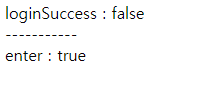
-소스 코드
<script>
    // && 연산자(논리곱)
    let id='user';
    let pw='1234';    //id가 거짓이므로 pw 계산하지 않음. 최소한의 과정으로 동작.
    let loginSuccess=(id=='user1') && (pw=='1234'); //변수 선언까지 함께
    document.write('loginSuccess : '+loginSuccess+'<br/>');

    document.write('-----------<br>');

    // || 연산자(논리합)
    let level='과장';
    let enter=(level=='대리')||(level=='과장')||(level=='팀장');
    document.write('enter : '+enter+'<br/>');
</script>
-출력값
3. 조건 연산자
조건식 판별하여 선택적 실행
(1) 삼항연산자
변수 = (조건식) ? (참일때 실행문) : (거짓일때 실행문);조건식에는 비교 연산자 사용.
예제)
-소스 코드
<script>
    let x=5;
    let y=7;
    let result; // 변수 선언
    result=(x > y)? x : y;
    document.write("큰 값 : " + result + "<br>");
</script>
-결과
| 큰 값 : 7 |
(2) 복합(확장)대입연산자
<script>
    let str='Hello';
    str = str + ' my';
    str = str + ' friend~';
    document.write('str의 값은? '+ str + '<br/>');

    // 위의 것을 축약
    str = 'hello ';
    str += 'my ';
    str += 'friend!! ';
    document.write('str의 값은? '+ str + '<br/>');
</script>
-결과
| str의 값은? Hello my friend~ |
| str의 값은? Hello my friend!! |
참고)
<script>
    a=10;
    a++;
    document.write('a 값은 '+a+'<br/>');
    a+1; //출력값 11. ??왜?? 위에서 a++ 증가연산했지만 대입 안 해줘서 참조 안 함.
    document.write('a 값은 '+a+'<br/>');
    a=a+1; //11인 a에 1을 증가하고 그 값을 a에 대입.
    document.write('a 값은 '+a+'<br/>');
    // 윗 문장과 같음. (a+=1;) == (a=a+1;)
</script>
-결과
| a 값은 11 a 값은 11 a 값은 12 |
4. 대입 연산자
'=' 기호를 사용하여 값이나 변수 할당
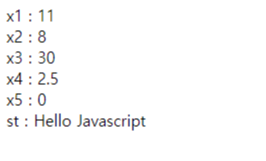
<script>
    var x1=x2=x3=x4=x5=10;
    var st="Hello ";
    x1+=1;
    document.write("x1 : " + x1 + "<br>");
    x2-=2;
    document.write("x2 : " + x2 + "<br>");
    x3*=3;
    document.write("x3 : " + x3 + "<br>");
    x4/=4;
    document.write("x4 : " + x4 + "<br>");
    x5%=5;
    document.write("x5 : " + x5 + "<br>");
    st+="Javascript";
    document.write("st : " + st + "<br>");
</script>
-결과
'수업 > └JavaScript' 카테고리의 다른 글
| 반복문_중첩 반복문 (0) | 2022.01.06 |
|---|---|
| 반복문_for, while, do-while (0) | 2022.01.05 |
| 연산자_문자열, 산술 (0) | 2022.01.04 |
| 변수 선언, 초기화, typeof (0) | 2022.01.04 |
| 데이터타입 (0) | 2022.01.04 |
댓글
공지사항
최근에 올라온 글
최근에 달린 댓글
- Total
- Today
- Yesterday
링크
TAG
- BAEKJOON
- A%B
- css
- 미디어 태그
- html
- typeof
- border-spacing
- initialized
- 기본선택자
- html layout
- selcetor
- improt
- 변수
- 입력양식
- JavaScript
- html pre
- 스크립태그
- text formatting
- html a tag
- 외부구성요소
- empty-cell
- html base tag
- caption-side
- Java
- ScriptTag
- html atrribute
- scanner
- CascadingStyleSheet
- html input type
- input type 종류
| 일 | 월 | 화 | 수 | 목 | 금 | 토 |
|---|---|---|---|---|---|---|
| 1 | ||||||
| 2 | 3 | 4 | 5 | 6 | 7 | 8 |
| 9 | 10 | 11 | 12 | 13 | 14 | 15 |
| 16 | 17 | 18 | 19 | 20 | 21 | 22 |
| 23 | 24 | 25 | 26 | 27 | 28 | 29 |
| 30 | 31 |
글 보관함