
티스토리 뷰
>> 라우터(Router)
0. 라우터 설치
-npm 홈페이지에서 아래 키워드 검색
| react-router-dom |
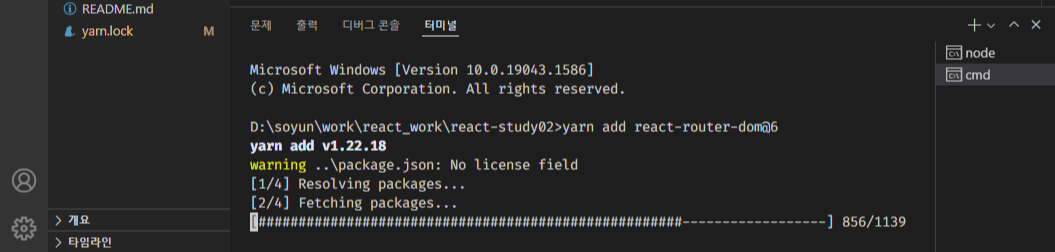
-VSCODE 터미널에서
| yarn add react-router-dom@6 |
1. 라우터
2. 실습 : react-router-dom
(1) react-router-dom 적용
-App8.js
import React from 'react';
import './App.css';

function App8() {
    return(
        <div>
			test
        </div>
    );
}
export default App8;
-index.js
리액트 라우터 돔을 사용하는 2가지 방식
import React from 'react';
import './index.css';
import App8 from './App8';
import reportWebVitals from './reportWebVitals';

import ReactDOM from 'react-dom/client';
import { BrowserRouter } from 'react-router-dom';

//리액트 라우터 돔 2
const root = ReactDOM.createRoot(dovument.getElementById('root'));
root.render(
  <BrowserRouter>
  <App8 />
  </BrowserRouter>,
);

//리액트 라우터 돔 1
// ReactDOM.render(
//   <BrowserRouter>
//   <App8 />
//   </BrowserRouter>,
//   document.getElementById('root'),
// );

//기존 것 -render
// const root = ReactDOM.createRoot(document.getElementById('root'));
// root.render(
//   <React.StrictMode>
//     <App8 />
//   </React.StrictMode>,
// );

reportWebVitals();
(2) 페이지 생성 및 연결
(2-1) App8.js
import React from 'react';
import { Route, Routes } from 'react-router-dom';
import About from './About';
import Home from './Home';
import './App.css';

function App8() {
    return(
        <div>
            <Routes>
                <Route path='/' element={<Home/>} />
                <Route path='/about' element={<About/>} />
            </Routes>
        </div>
    );
}
export default App8;
(2-2) Home.js
import React from 'react';

function Home() {
  return (
    <div>
      <h1>홈페이지입니다!</h1>
      <p>홈페이지 첫화면!!!!!</p>
    </div>
  );
}

export default Home;
(2-3) About.js
import React from 'react';

function About() {
  return (
    <div>
      <h1>소개 페이지</h1>
      <p>react router dom을 사용하여 페이지 구분하기</p>
    </div>
  );
}

export default About;
>> 각 페이지 링크 연결하기 : App8.js
import React from 'react';
import { Link, Route, Routes } from 'react-router-dom';
import About from './About';
import Home from './Home';
import './App.css';

function App8() {
  return (
    <div>
    //각 페이지로 연결되는 링크 추가
      <ul>
        <li>
          <Link to="/">Home</Link>
        </li>
        <li>
          <Link to="/about">About</Link>
        </li>
      </ul>
      <Routes>
        <Route path="/" element={<Home />} />
        <Route path="/about" element={<About />} />
      </Routes>
    </div>
  );
}
export default App8;
(3) 메인 화면 출력 관련
(3-1) 폴더 생성 및 파일 이동
-routes 폴더 생성 : Home.js , About.js 파일 이동
-components 폴더 생성 : Movie.js, Movie.css 파일 이동
(3-2) Home
-App8에는 링크만 있으면 되고
-App7.js에서 데이터 가져와 출력한 걸 로딩(import)할 것
import React from 'react';
import axios from 'axios';
import Movie from '../components/Movie';

import './Home.css'

function Home() {
  return (
    <div>
      <h1>홈페이지</h1>
      <p>WELCOME to HOMEPAGE</p>
    </div>
  );
}

export default Home;
(3-3) Home.css 생성
.container {
  height: 100%;
  display: flex;
  justify-content: center;
}

.loader {
  width: 100%;
  height: 100vh;
  display: flex;
  justify-content: center;
  align-items: center;
  font-weight: 300;
}

.movies {
  display: grid;
  grid-template-columns: repeat(2, minmax(400px, 1fr));
  grid-gap: 100px;
  padding: 50px;
  width: 80%;
  padding-top: 70px;
}

@media screen and(max-width: 1090px) {
  .movies {
    grid-template-columns: 1fr;
    width: 100%;
  }
}
(3-4) Home.js에
App7.js에서 데이터를 가져와 출력했던 것처럼 수정해줄 것. App7.js의 코드 복붙.
import React from 'react';
import axios from 'axios';
import Movie from '../components/Movie';

import './Home.css';

class Home extends React.Component {
  state = {
    isLoading: true,
    movies: [],
  };

  render() {
    const { isLoading, movies } = this.state;
    return (
      <section className="container">
        {isLoading ? (
          <div className="loader">
            <span className="loader-text">Loading...</span>
          </div>
        ) : (
          <div className="movies">
            {movies.map((movie) => {
              return (
                <Movie
                  key={movie.id}
                  year={movie.year}
                  title={movie.title}
                  summary={movie.summary}
                  poster={movie.medium_cover_image}
                  genres={movie.genres} //추가
                />
              );
            })}
          </div>
        )}
      </section>
    );
  }

  getMovies = async () => {
    try {
      //구조 분해 할당을 간략하게
      const {
        data: {
          data: { movies },
        },
      } = await axios.get('https://yts-proxy.now.sh/list_movies.json?limit=5&sort_by=rating');
      this.setState({ movies: movies, isLoading: false });
    } catch (error) {
      console.log('Error');
      console.log(error);
    }
  };

  componentDidMount() {
    this.getMovies();
  }
}

export default Home;
>> 실행 결과

(4) HashRouter 사용
(4-1) App8.js 수정
-HashRouter로 수정 → HashRouter가 제대로 안 먹혀서 Routes로 수정, element 수정
import React from 'react';
//Link 삭제 → Navigation
import { Route, Routes } from 'react-router-dom';
import About from './routes/About';
import Home from './routes/Home';
import Detail from './routes/Detail';
import Navigation from './components/Navigation';

function App8() {
  return (
    <div>
      <Navigation />
      <Routes>
        <Route path="/" element={<Home />} exact={true} />
        <Route path="/about" element={<About />} />
        <Route path="/movie-detail" element={<Detail />} />
      </Routes>
    </div>
  );
}
export default App8;
(4-2) 파일 생성 : Navigation 관련
-components / Navigation.js
import React from 'react';
import { Link } from 'react-router-dom';
import './Navigation.css';

function Navigation() {
  return (
    <div className="nav">
      <Link to="/">HOME</Link>
      <Link to="/about">ABOUT</Link>
    </div>
  );
}

export default Navigation;
-components / Navigation.css
.nav {
  z-index: 1;
  position: fixed;
  top: 50px;
  left: 10px;
  display: flex;
  flex-direction: column;
  background-color: white;
  padding: 10px 20px;
  border-radius: 5px;
  box-shadow: 10 13px 27px -5px rgba(50, 50, 90, 0.25), 0 8px 16px -8px rgba(0, 0, 0, 0.3),
    0 -6px 16px -6px rgba(0, 0, 0, 0.25);
}

@media screen and (max-width: 1090px) {
  .nav {
    left: initial;
    top: initial;
    bottom: 0px;
    width: 100%;
  }
}

.nav a {
  text-decoration: none;
  color: #0008fc;
  text-transform: uppercase;
  font-size: 12px;
  text-align: center;
  font-weight: 600;
}

.nav a:not(:last-child) {
  margin-bottom: 20px;
}
(4-3) 파일 생성 : Detail 관련
-Detail.js
import React from 'react';

class Detail extends React.Component {
  render() {
    const { location } = this.props;
    if (location.state) {
      return <span>{location.state.title}</span>;
    } else {
      return null;
    }
  }
  componentDidMount() {
    const { location, history } = this.props;
    if (location.state === undefined) {
      history.push('/');
    }
  }
}

export default Detail;
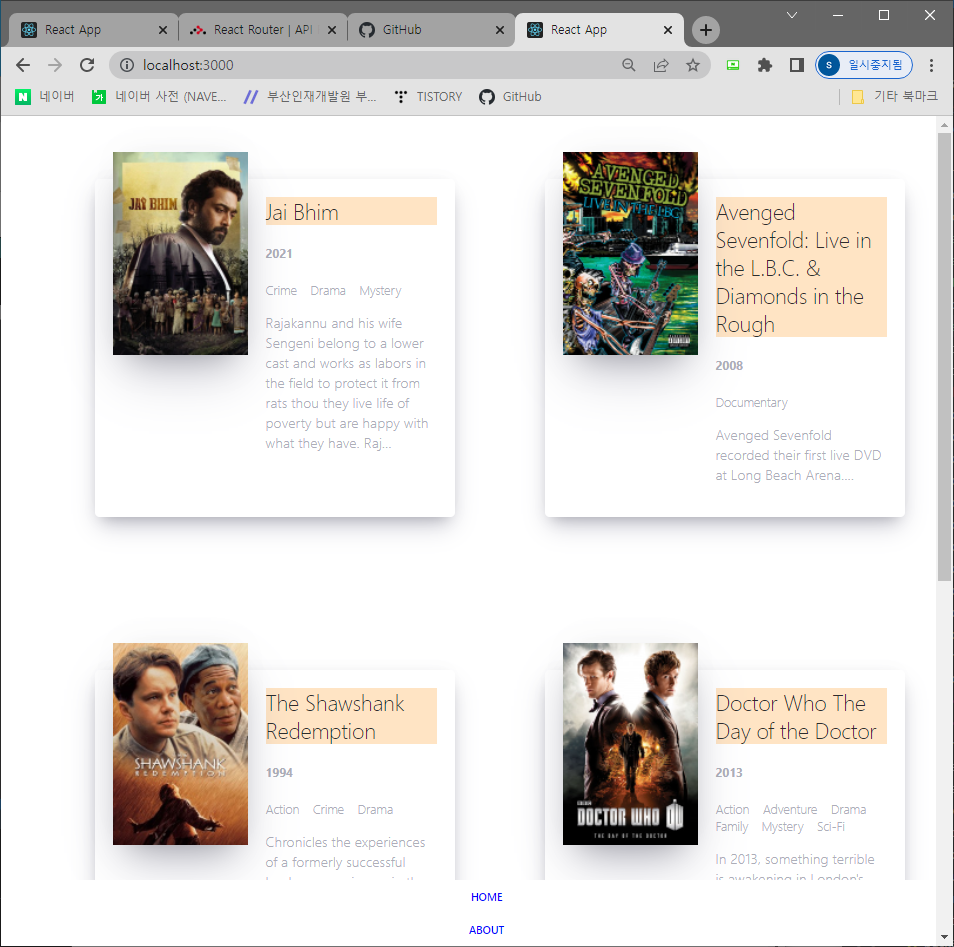
>> 페이지 로딩과 링크가 제대로 연결되었는지 확인
[ Home ]을 누르면 홈페이지로, [ABOUT]을 누르면 소개페이지로 이동
(4-4) 영화를 눌렀을 때, 상세보기
prop으로 안 됨? → ES5 버전에서 처리하는 것!
>> 기존에 설치했던 리액트-라우터-돔을 삭제하고 재설치 : VSCODE 터미널에서 명령어 입력
(참고로 터미널에서 cmd 상태일 것)
| >>yarn remove react-router-dom |
>>재설치
| >>yarn add react-router-dom@5.2.1 |
결과
| D:\work\react_work\react-study02>yarn add react-router-dom@5.2.1 yarn add v1.22.18 warning ..\package.json: No license field [1/4] Resolving packages... [2/4] Fetching packages... [3/4] Linking dependencies... warning " > @testing-library/user-event@13.5.0" has unmet peer dependency "@testing-library/dom@>=7.21.4". warning "react-scripts > eslint-config-react-app > eslint-plugin-flowtype@8.0.3" has unmet peer dependency "@babel/plugin-syntax-flow@^7.14.5". warning "react-scripts > eslint-config-react-app > eslint-plugin-flowtype@8.0.3" has unmet peer dependency "@babel/plugin-transform-react-jsx@^7.14.9". warning "react-scripts > react-dev-utils > fork-ts-checker-webpack-plugin@6.5.1" has unmet peer dependency "typescript@>= 2.7". warning "react-scripts > eslint-config-react-app > @typescript-eslint/eslint-plugin > tsutils@3.21.0" has unmet peer dependency "typescript@>=2.8.0 || >= 3.2.0-dev || >= 3.3.0-dev || >= 3.4.0-dev || >= 3.5.0-dev || >= 3.6.0-dev || >= 3.6.0-beta || >= 3.7.0-dev || >= 3.7.0-beta". warning "react-router-dom > react-router > mini-create-react-context@0.4.1" has incorrect peer dependency "react@^0.14.0 || ^15.0.0 || ^16.0.0 || ^17.0.0". [4/4] Building fresh packages... success Saved lockfile. success Saved 9 new dependencies. info Direct dependencies └─ react-router-dom@5.2.1 info All dependencies ├─ hoist-non-react-statics@3.3.2 ├─ isarray@0.0.1 ├─ mini-create-react-context@0.4.1 ├─ path-to-regexp@1.8.0 ├─ react-router-dom@5.2.1 ├─ react-router@5.2.1 ├─ resolve-pathname@3.0.0 ├─ tiny-warning@1.0.3 └─ value-equal@1.0.1 Done in 7.14s. |
>>App8.js Routes 에러 → HashRouter로 변경
import React from 'react';
//Routes → HashRouter 변경
//Link 삭제 → Navigation
import { Route, HashRouter } from 'react-router-dom'; //★reacte-router-dom 버전 변경(5.2.1)에 따른 코드 변경
import About from './routes/About';
import Home from './routes/Home';
import Detail from './routes/Detail';
import Navigation from './components/Navigation';

//★reacte-router-dom 버전 변경(5.2.1)에 따른 코드 변경 : <HashRouter>, element → component, <Home> → Home
function App8() {
  return (
    <div>
      <HashRouter>
        <Navigation />
        <Route path="/" component={Home} exact={true} />
        <Route path="/about" component={About} />
        <Route path="/movie-detail" component={Detail} />
      </HashRouter>
    </div>
  );
}
export default App8;
>> yarn start 후 웹브라우저에서 검사
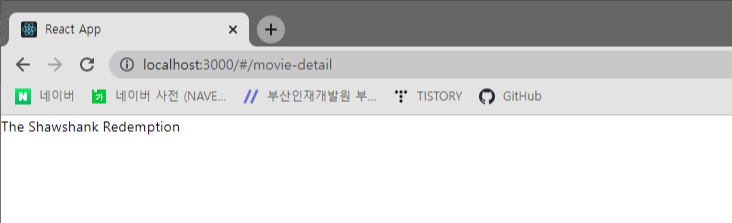
영화 목록 클릭하면, 페이지 이동
(4-5)
ddd
'수업 > └리액트(React)' 카테고리의 다른 글
| [08-1] 실습 : 부트스트랩_state (0) | 2022.04.27 |
|---|---|
| [08]부트스트랩(Bootstrap) (0) | 2022.04.27 |
| [06]비동기 통신 모듈 : Axios & 영화 정보 불러오기 (0) | 2022.04.22 |
| [00]컴포넌트 실습 - 시간에 따라 출력문 변경 (0) | 2022.04.21 |
| [00]리액트 - 컴포넌트(component) (0) | 2022.04.20 |
- Total
- Today
- Yesterday
- html
- 미디어 태그
- CascadingStyleSheet
- html atrribute
- html input type
- typeof
- html a tag
- initialized
- 입력양식
- 변수
- improt
- 외부구성요소
- Java
- A%B
- selcetor
- border-spacing
- text formatting
- ScriptTag
- html base tag
- empty-cell
- input type 종류
- css
- 스크립태그
- JavaScript
- html pre
- 기본선택자
- scanner
- caption-side
- html layout
- BAEKJOON
| 일 | 월 | 화 | 수 | 목 | 금 | 토 |
|---|---|---|---|---|---|---|
| 1 | ||||||
| 2 | 3 | 4 | 5 | 6 | 7 | 8 |
| 9 | 10 | 11 | 12 | 13 | 14 | 15 |
| 16 | 17 | 18 | 19 | 20 | 21 | 22 |
| 23 | 24 | 25 | 26 | 27 | 28 | 29 |
| 30 | 31 |